
Every great event deserves more than just photos and group chat memories. The Invyt Memory Book gives your guests a way to write personal messages, attach meaningful photos, and contribute to a beautifully designed keepsake that you, the host, can download as a PDF and treasure forever.
Here is exactly how it works, from start to finish.
Step 1: Guests Discover the Memory Book on Your Event Page
When guests visit your Invyt event page, they will see a Memory Book card below the event details. This card shows the price per page (starting from A$1.99), how many guests have already contributed, and the name of the most recent contributor as social proof.
Guests simply tap the card to get started.
Step 2: Guests Write Their Message
A guided wizard opens and walks the guest through four simple steps.
First, the guest enters their name, email address, and a personal message for the host. To make things easier, Invyt suggests message templates tailored to the type of event. For example, a wedding event will show heartfelt wedding wishes, while a birthday event will show celebratory birthday messages. Guests can use a suggestion as a starting point or write something entirely from scratch.
Step 3: Guests Choose a Photo
Next, the guest selects a photo to accompany their message. There are two options:
- Upload a personal photo directly from their device (up to 5MB, supports JPEG, PNG, and WebP)
- Pick from curated stock photos that match the event occasion, such as floral frames for weddings, woodland themes for baby showers, or festive designs for Eid celebrations
The stock photo collection is curated and regularly updated, so there is always something that fits the mood of the event.
Step 4: Review and Preview
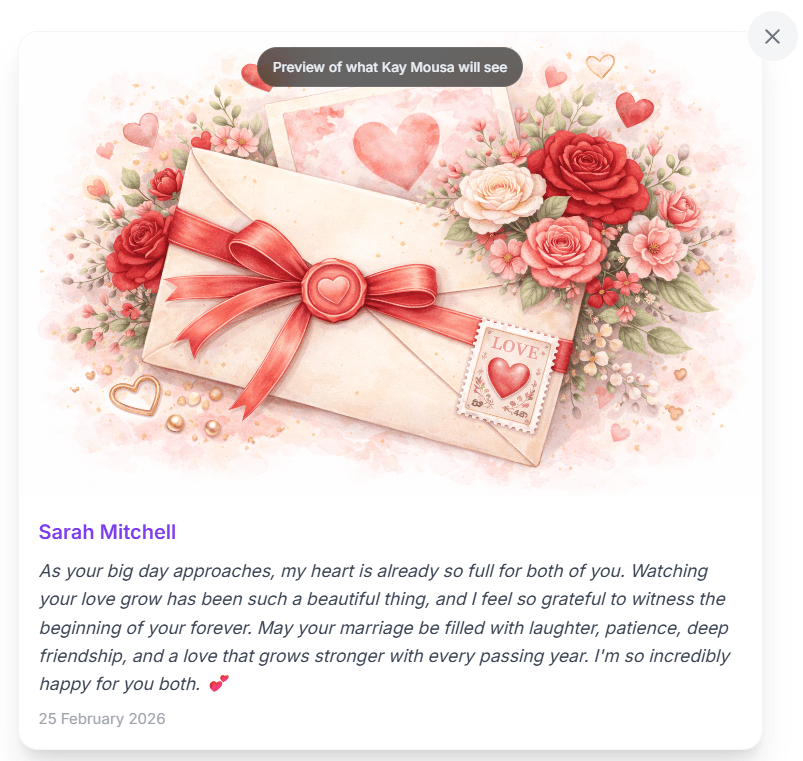
Before paying, the guest sees a realistic preview of exactly how their memory page will look. The preview displays their chosen photo, their name in elegant violet text, their full message, and the date. If anything needs changing, they can go back and edit before proceeding.
Step 5: Secure Checkout
Once happy with the preview, the guest moves to checkout. Invyt uses Stripe Embedded Checkout for a fast, secure payment experience that stays on the page without any redirects. The guest pays the per page price (A$1.99 by default), and the transaction is processed instantly.
After payment is confirmed, the guest sees a success message and the Memory Book card on the event page updates to show a green confirmation: "Your page was added."
Step 6: Guests Can Edit Their Page Anytime
Changed your mind about the wording? No problem. Guests can return to the event page at any time and tap "Edit my memory" on the updated Memory Book card.
For security, Invyt sends a 6 digit verification code to the email address used during purchase. Once verified, the guest receives a short lived edit token and can update their message, swap their photo, or make any other changes. The edit window is protected by signed tokens that expire after 15 minutes, keeping every page secure.
Step 7: The Host Views All Memory Pages
On the host dashboard, there is a dedicated Memory Book panel. Expanding it reveals a grid of every completed guest page. Each card in the grid shows the guest's photo thumbnail, their name, and a preview of their message.
Tapping any card opens a full lightbox view with the complete message and photo at full resolution. The host can browse through all contributions at any time as new pages come in.
Step 8: The Host Downloads the PDF
When the host is ready to save their Memory Book, they tap the "Download PDF" button in the Memory Book panel. Invyt generates a professionally formatted A4 PDF on the spot.
The PDF includes:
- A cover page with the title "Memory Book," the event name, the host's name, the event date, and the total number of guest pages
- A dedicated page for each guest featuring their full width photo, their name in violet, their complete message, and the date they submitted it
- Pages are arranged in chronological order, from the first contribution to the most recent
The PDF downloads instantly as "Memory Book — [Event Name].pdf" and can be printed at home, sent to a professional printer, or simply kept as a digital keepsake.
Why Guests Love It
- Takes less than two minutes to complete
- No app download or account signup required
- Suggested messages remove the "blank page" anxiety
- Stock photos mean they do not need to have the perfect picture on hand
- They can edit their page after submitting
Why Hosts Love It
- A tangible keepsake from the people who matter most
- Zero effort required from the host; guests do all the work
- Professionally formatted PDF ready for printing
- Every page is paid for individually, so there is no upfront cost to the host
- All contributions are visible in the dashboard in real time
Get Started
The Memory Book is available on every Invyt event. Create your event at invyt.io, share the link with your guests, and let them build something truly special for you.